

Why Forecast Property Data?
Forecasting median purchase prices is important to real estate analytics as it helps inform investment decisions, urban planning, and policy development.
Looking at both residential dwellings and vacant land provides a more complete view of the market because each reflects different dynamics and signals.
Residential property prices are significant because housing makes up a large share of household wealth and economic activity. Changes in these prices can affect affordability, lending, consumer behaviour, and overall financial stability.
Whereas vacant land offers a more forward-looking perspective. Land values often reflect expectations around population growth, infrastructure, and zoning, making them a useful indicator of future development and housing supply.
Together, these two segments help build a clearer understanding of current market conditions and what may lie ahead.
Turning Property Data into Forecasts
Using Data Army Intel’s New South Wales (NSW) Property Sales data, we demonstrate how to forecast median purchase prices for both residential dwellings and vacant land.
To generate the forecasts, we’ll step through how to use Snowflake’s Cortex ML function for forecasting. This function offered by Snowflake is quick to set up, easy to use and produces fundamental insights when forecasting.
Overview of Data Used
The dataset used is NSW Property Sales data which is currently available with a limited free trial. Updated weekly, it contains information (excluding property ownership) about property sale records since 1990.
Key features of this dataset include:
- Property details
- Contract dates
- Settlement dates, and
- Purchase prices
NSW Property Sales Data
Access comprehensive NSW property sales data to power forecasting, market analysis, and investment insights. Now available on Snowflake Marketplace with a free trial.
Technical How-To Guide
Step 1: Accessing the data
- On the NSW Property Sales data listing on the Snowflake Marketplace, click the ‘Get’ button and the top right of the page to access the dataset. Either create a new Snowflake account or sign in if one already exists.
- Once your Snowflake account is set up and running, the dataset is located within Data Products and then Marketplace. Click on the Open button to explore the sample data within the Snowflake environment.
Step 2: Finding median purchase prices
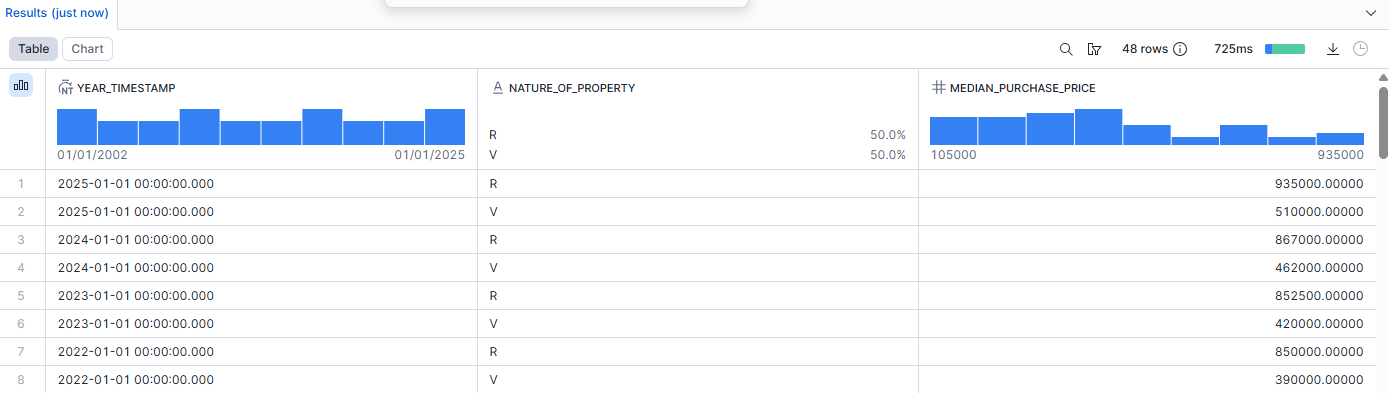
Run the following code in any Snowflake worksheet. This will produce a table with the median purchase price for both residential dwellings and vacant land in every year with complete data i.e. 2002-2025.
create or replace table forecasting_median_prices as
SELECT
    TO_TIMESTAMP(year || '-01-01') AS year_timestamp,
    nature_of_property,
    MEDIAN(purchase_price) AS median_purchase_price
FROM nsw_property_sales_aus_paid.nsw_property_sales_total
WHERE nature_of_property IN ('R', 'V')
  AND year >= 2002
  AND year < 2026
GROUP BY year, nature_of_property
ORDER BY year DESC, nature_of_property;
Important Note:
Snowflake’s Forecasting function requires a timestamp field to work, hence we have converted the numeric year value into a timestamp.
Here are the results of that query:
Step 3: Accessing Snowflake's Cortex AI functions
On the left toolbar, hover over Snowflake’s Cortex AI offerings and select Functions
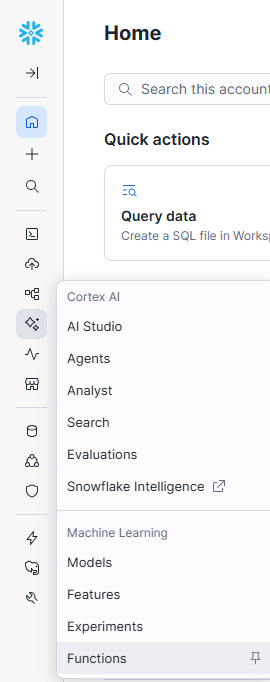
In the Functions tab, click Create on the Forecasting tab.

Snowflake will step through how to create a forecast.
If additional guidance is required, here are the fields for each step in this example.
- Fill in the model name (can be anything), role and warehouse.
- Find the table which was used to save the previous query into.
- For the target column, “MEDIAN_PURCHASE_PRICE” was selected as the forecast to predict in this example.
- For the timestamp column, “YEAR_TIMESTAMP” was selected.
- For the series identifier, “NATURE_OF_PROPERTY” was selected to predict the future median purchase prices for both residential dwellings and vacant land.
- Skip through additional features as there aren't any to choose from.
- Set the forecast horizon to any length of time you require. In this example, it is set to 3 years. Adjust the prediction interval as needed (default is 0.95). The table name can be defined as required.
Once the steps are completed, Snowflake will automatically create a worksheet with all the code required to perform the forecast.
Run each line of code to create the predictions.
Here’s what our results look like:
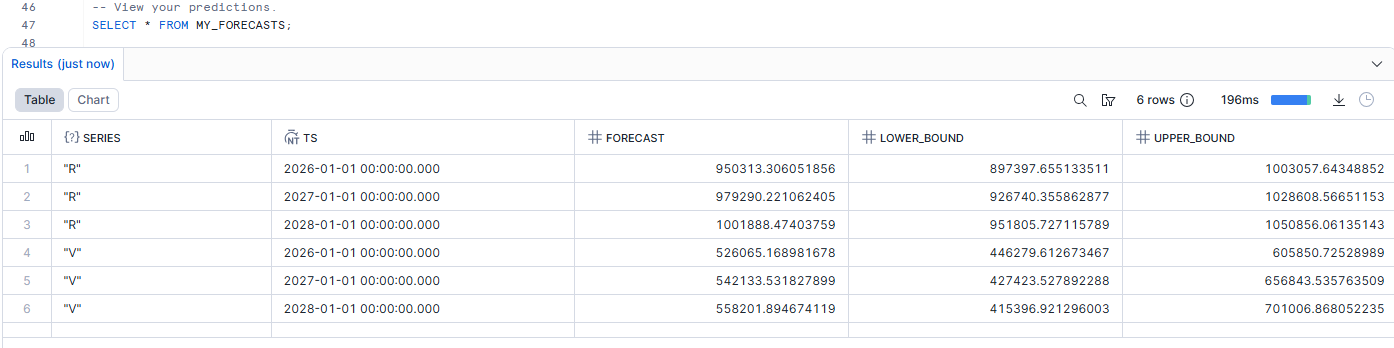
Congratulations, you've just used Snowflake’s Cortex ML to create a forecast!
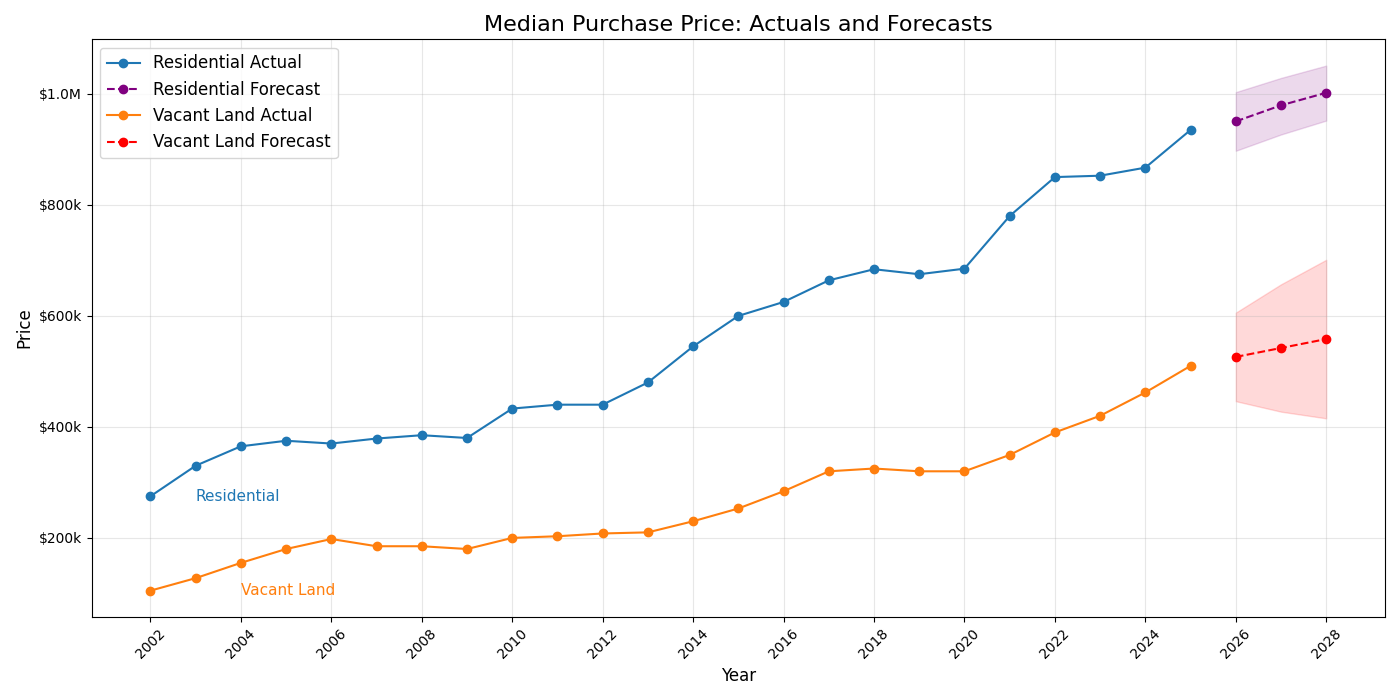
Why not take it a step further and visualise the predictions?
Step 4: Create a graph
Download the combined prediction table (historical + forecasts) and copy this Python script that uses matplotlib to create a basic graph.
import pandas as pd
import matplotlib.pyplot as plt
import matplotlib.dates as mdates
from matplotlib.ticker import FuncFormatter

# Read CSV
file_path = r"<INSERT FILE PATH>"
df = pd.read_csv(file_path)

# Convert timestamp
df["YEAR_TIMESTAMP"] = pd.to_datetime(df["YEAR_TIMESTAMP"])
df = df.sort_values(["NATURE_OF_PROPERTY", "YEAR_TIMESTAMP"])

# Rename property types
property_labels = {
    "R": "Residential",
    "V": "Vacant Land"
}

plt.figure(figsize=(14, 7))

for prop, group in df.groupby("NATURE_OF_PROPERTY"):
    label = property_labels.get(prop, prop)

    actual_df = group[group["ACTUAL"].notna()]
    forecast_df = group[group["FORECAST"].notna()]

    # Plot actual
    line_actual, = plt.plot(
        actual_df["YEAR_TIMESTAMP"],
        actual_df["ACTUAL"],
        marker="o",
        label=f"{label} Actual"
    )

    # Set forecast color per property
    forecast_color = "purple" if prop == "R" else "red"

    # Plot forecast
    plt.plot(
        forecast_df["YEAR_TIMESTAMP"],
        forecast_df["FORECAST"],
        marker="o",
        linestyle="--",
        color=forecast_color,
        label=f"{label} Forecast"
    )

    # Confidence interval (match forecast color)
    if (
        forecast_df["LOWER_BOUND"].notna().any()
        and forecast_df["UPPER_BOUND"].notna().any()
    ):
        plt.fill_between(
            forecast_df["YEAR_TIMESTAMP"],
            forecast_df["LOWER_BOUND"],
            forecast_df["UPPER_BOUND"],
            alpha=0.15,
            color=forecast_color
        )

    # Inline label (pushed right)
    if not actual_df.empty:
        first_x = actual_df["YEAR_TIMESTAMP"].iloc[0]
        first_y = actual_df["ACTUAL"].iloc[0]

        # Set offset: 1 year for Residential, 2 years for Vacant Land
        offset_years = 1 if prop == "R" else 2

        plt.text(
            first_x + pd.DateOffset(years=offset_years),
            first_y,
            label,
            fontsize=11,
            verticalalignment="center",
            color=line_actual.get_color()
        )

# Currency formatter
def currency_formatter(x, pos):
    if x >= 1_000_000:
        return f"${x/1_000_000:.1f}M"
    elif x >= 1_000:
        return f"${x/1_000:.0f}k"
    else:
        return f"${x:.0f}"

plt.gca().yaxis.set_major_formatter(FuncFormatter(currency_formatter))

# Titles and labels
plt.title("Median Purchase Price: Actuals and Forecasts", fontsize=16)
plt.xlabel("Year", fontsize=12)
plt.ylabel("Price", fontsize=12)

# Legend styling
plt.legend(fontsize=12)

# Grid + axis formatting
plt.grid(True, alpha=0.3)

plt.gca().xaxis.set_major_locator(mdates.YearLocator(2))
plt.gca().xaxis.set_major_formatter(mdates.DateFormatter("%Y"))

plt.xticks(rotation=45)
plt.tight_layout()
plt.show()
Run the script and view the results!
Snowflake Cortex AI Functions (including LLM functions)
Use Cortex AI Functions in Snowflake to run unstructured analytics on text and images.
Do More With Our Data
Now that you know how simple it is to generate forecasts with Snowflake’s Cortex ML functions, why not use it to make more predictions using our range of data?
Unlock New Insights With Data Army Intel
We have a broad range of free data products on Snowflake Marketplace for you to discover.
All rights are reserved, and no content may be republished or reproduced without express written permission from Data Army. All content provided is for informational purposes only. While we strive to ensure that the information provided here is both factual and accurate, we make no representations or warranties of any kind about the completeness, accuracy, reliability, suitability, or availability with respect to the blog or the information, products, services, or related graphics contained on the blog for any purpose.
More Intel from Data Army




Intel In Your Inbox
Sign up to our newsletter and receive our latest knowledge articles, practical guides and datasets.